
※当ブログではアフィリエイト広告を利用しています。
iOSでファイル等をアプリ間連携する場合、UIDocumentInteractionControllerクラスを使用すると簡単に実装することができます。
しかし同クラスを使用して「別のアプリで開く」を実装してもiOS標準の「メールで送信」等が表示されず、小一時間ハマりました。原因は単純なことだったので解決法をメモします。
UIDocumentInteractionControllerでメールアプリ等が表示されなかった方法
以下はXCodeプロジェクト内にsample.jpgという画像ファイルを追加し、Navigation Controllerに埋め込んだUIViewControllerで、「別のアプリで開く」を実装するサンプルコードです。
//ナビゲーションバーのボタンを押すと他のアプリで開くメニューを表示するサンプル
#import "ViewController.h"

@interface ViewController ()<UIDocumentInteractionControllerDelegate>

@property UIDocumentInteractionController *docInteractionController;

@end

@implementation ViewController

- (void)viewDidLoad
{
    [super viewDidLoad];

    NSString *filepath = [[NSBundle mainBundle] pathForResource:@"sample" ofType:@"jpg"];

    self.docInteractionController = [UIDocumentInteractionController
                                     interactionControllerWithURL:[NSURL fileURLWithPath:filepath]];
    self.docInteractionController.delegate = self;

    UIBarButtonItem *actionButtonItem = [[UIBarButtonItem alloc] initWithBarButtonSystemItem:UIBarButtonSystemItemAction
                                                                                      target:self
                                                                                      action:@selector(actionButtonClick:)];

    self.navigationItem.rightBarButtonItem = actionButtonItem;

}

- (IBAction)actionButtonClick:(id)sender
{
    // 「別のアプリで開く」は出るがiOS標準のメール等が表示されない
    [self.docInteractionController presentOpenInMenuFromBarButtonItem:sender animated:YES];
}

@end
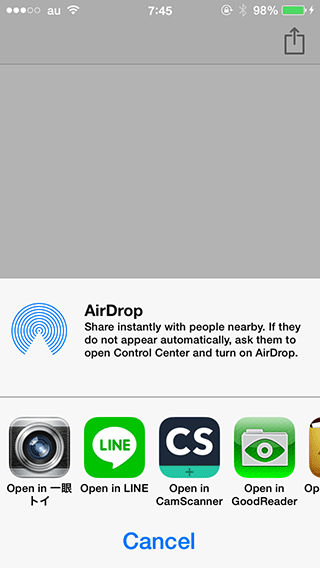
上記コードを実行すると、ナビゲーションバー右上に別アプリ連携用のボタンが表示されます。ボタンを押すと画像ファイルを開ける別のアプリは表示されますが、標準のメールアプリ等は表示されません。
メールアプリ等が表示される方法
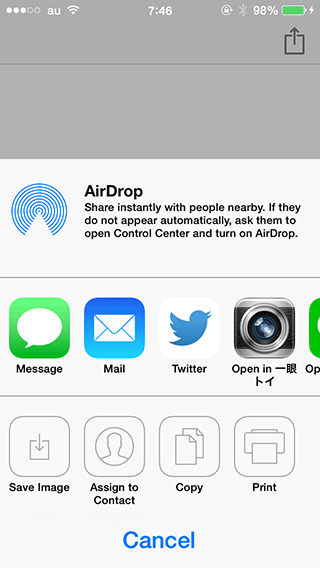
原因は単純で、別アプリ連携ボタンを押したときに呼ばれるpresentOpenInMenuFromBarButtonItemメソッドをpresentOptionsMenuFromBarButtonItemに変えたらメールアプリ等も表示されました。
- (IBAction)actionButtonClick:(id)sender
{
    // 「メール」も「別のアプリで開く」も表示される
    [self.docInteractionController presentOptionsMenuFromBarButtonItem:sender animated:YES];
}

@end
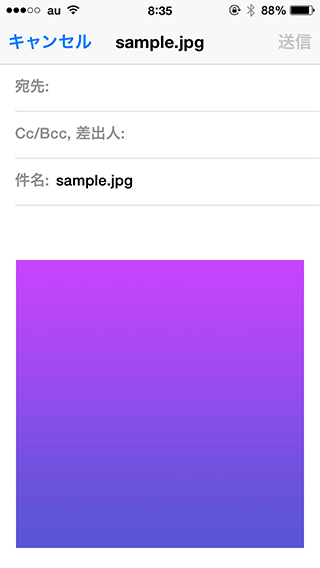
ファイルのメール添付も問題なく実行されました。
参考資料
Appleが公開しているDocInteractionのサンプルコードではメールアプリ等が表示されたため、コードを追っていったところ原因がわかりました。
名前が似ているメソッドには要注意ですね。
リンク:DocInteraction

